Are you struggling to find the right candidates quickly and efficiently? Managing your recruitment process can feel overwhelming with endless resumes, interviews, and follow-ups.
What if there was a way to simplify all this and save your valuable time? Odoo for Recruitment offers a powerful solution designed to make hiring smooth and organized. You’ll discover how Odoo can transform your recruitment process, helping you attract top talent while staying in control every step of the way.
Keep reading to learn how you can turn recruitment chaos into clarity.
Benefits Of Odoo In Recruitment
Odoo offers many benefits for recruitment teams. It simplifies how companies find and hire new employees. This software helps manage candidates and speeds up the hiring process. Teams also work better together with Odoo. These advantages make recruitment easier and more efficient.
Improved Candidate Management
Odoo keeps all candidate information in one place. Recruiters can track resumes, interviews, and feedback quickly. This organized system reduces errors and lost data. It helps recruiters follow up with candidates on time. Clear records improve the overall hiring experience.
Faster Hiring Process
Odoo automates many manual tasks in recruitment. Job postings reach multiple sites with just a few clicks. Screening and sorting candidates happens faster. Automated emails keep candidates informed without delay. This speeds up every step from application to offer.
Enhanced Collaboration
Odoo allows team members to share notes and updates easily. Hiring managers and recruiters can view candidate progress together. This reduces misunderstandings and duplicate work. Everyone stays on the same page throughout the process. Better teamwork leads to smarter hiring decisions.

Credit: www.youtube.com
Key Features Of Odoo Recruitment
Odoo Recruitment offers many features that simplify hiring tasks. It helps companies manage job openings, applications, and interviews all in one place. These tools reduce manual work and save time. Here are the key features that make Odoo Recruitment a useful tool for HR teams.
Automated Job Posting
Odoo allows automatic job posting on multiple platforms. Post your job ads quickly to websites and social media. This feature keeps your listings updated without extra effort. It helps reach more candidates faster and easier.
Applicant Tracking System
The applicant tracking system organizes candidate information neatly. Track each applicant’s progress from application to hiring. Filter and sort candidates based on skills and experience. This system makes managing many applicants simple and clear.
Interview Scheduling
Odoo helps schedule interviews with ease. It sends invites and reminders to candidates and interviewers. This feature avoids double bookings and missed meetings. It keeps everyone informed and on time for interviews.
Resume Parsing
Resume parsing extracts key information from CVs automatically. It saves time by filling candidate profiles quickly. This feature reads resumes and highlights skills, experience, and contact details. It speeds up the review process and improves accuracy.
Setting Up Odoo Recruitment Module
Setting up the Odoo Recruitment module is a key step for managing your hiring process efficiently. This module helps organize job openings, track applicants, and streamline recruitment tasks. Setting it up correctly ensures smooth operations and better candidate management.
Below are the main steps to set up the Odoo Recruitment module effectively. Follow these to get started with ease and customize the system to fit your needs.
Installation Steps
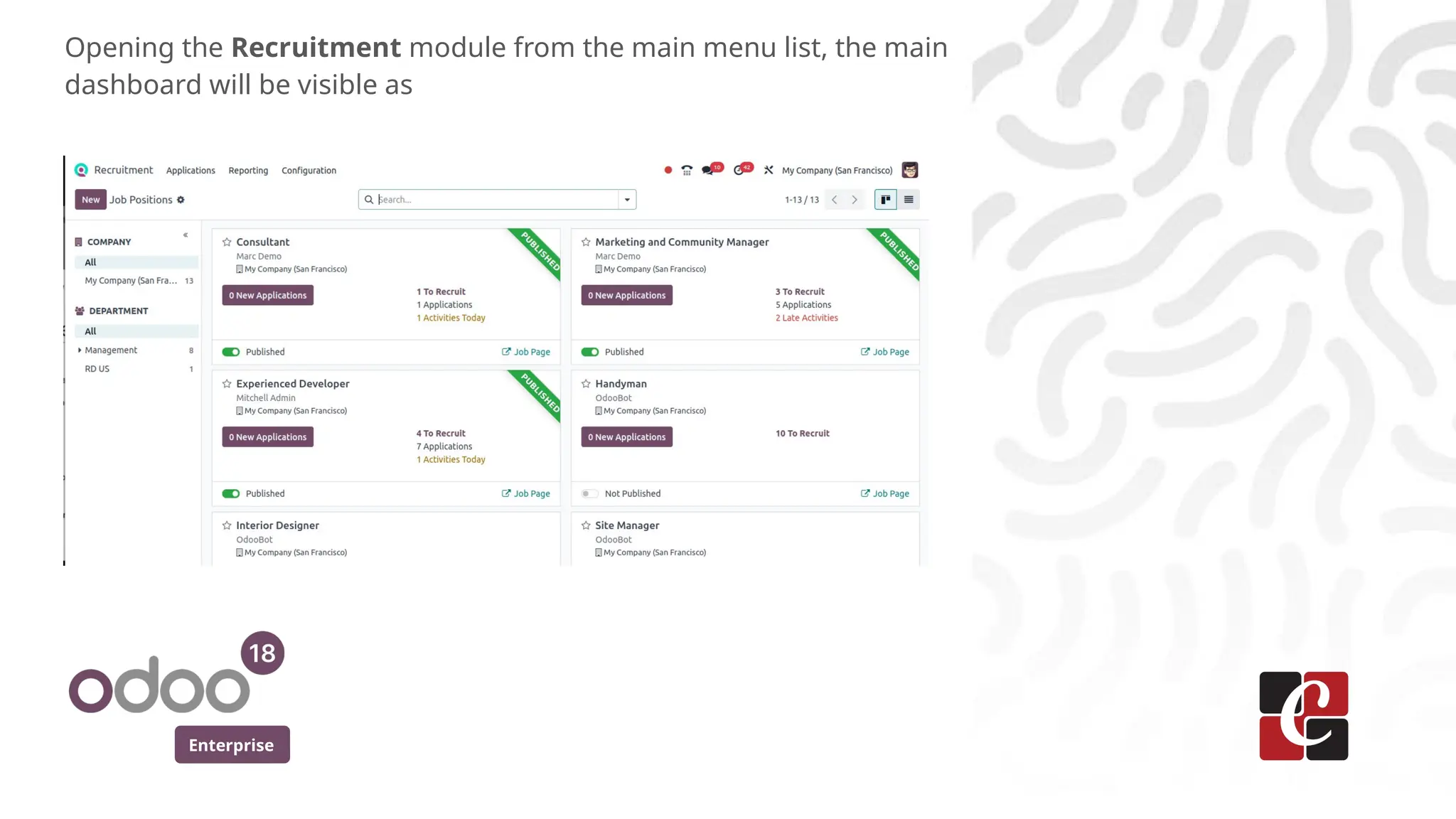
First, access your Odoo dashboard. Navigate to the Apps menu. Search for the “Recruitment” module. Click the “Install” button. Wait for the installation to complete. The module will now appear in your main menu. You can start using it immediately after installation.
Customizing Job Templates
Open the Recruitment module. Go to the Job Positions section. Click “Create” to add a new job template. Enter the job title and description. Set the department and job type. Add required skills and qualifications. Save your template. This helps keep job listings consistent and clear.
Configuring Workflows
In the Recruitment module, find the Settings menu. Look for the Workflow section. Define the stages your candidates will pass through. Examples include Application Received, Interview, and Offer. Assign responsible team members to each stage. Adjust notifications to keep everyone updated. Save these settings to apply your workflow.
Credit: www.slideshare.net
Integrating Odoo With Other Tools
Odoo for Recruitment becomes more powerful with tool integration. It helps streamline hiring and saves time. Integrating Odoo with other software makes the recruitment process smooth and efficient. This section explains how Odoo connects with popular tools. These connections improve communication and organization in hiring.
Email Integration
Email is vital for recruitment communication. Odoo links with email services like Gmail and Outlook. Recruiters can send and receive emails inside Odoo. This reduces the need to switch apps. It also tracks all candidate messages in one place. Email templates speed up replies and keep messages consistent.
Calendar Sync
Scheduling interviews requires careful planning. Odoo syncs with calendars such as Google Calendar and Outlook. This keeps interview dates and reminders up to date. It stops double bookings and missed meetings. Candidates and recruiters see available time slots easily. Syncing calendars helps keep the recruitment timeline clear.
Hr And Payroll Systems
Odoo works well with HR and payroll software. This connection moves new hire details directly into payroll. It reduces manual data entry and errors. HR teams can manage employee records from one place. Integrating payroll ensures timely salary payments. The result is a smoother process after recruitment ends.
Best Practices For Streamlined Hiring
Streamlined hiring makes recruitment faster and more efficient. It reduces delays and helps find the right candidate quickly. Using Odoo for recruitment supports this process well. Following best practices improves your chances of success.
Defining Clear Job Requirements
Start with clear job requirements. Write simple and specific descriptions. List key skills, experience, and responsibilities. Avoid vague terms that confuse candidates. Clear requirements attract suitable applicants and save time.
Leveraging Automation For Screening
Use Odoo’s automation tools to screen applicants. Set filters for qualifications and experience. Automatically sort resumes and rank candidates. Automation cuts down manual work and speeds up decisions.
Engaging Candidates Effectively
Keep communication clear and timely. Send updates and feedback promptly. Use Odoo to schedule interviews and follow-ups. Good engagement keeps candidates interested and improves their experience.
Case Studies Of Odoo Recruitment Success
Case studies provide real examples of how Odoo improves recruitment. They show how different businesses use Odoo to solve hiring challenges. These stories highlight practical results and lessons learned. Below are two examples from small and large companies.
Small Business Implementation
A small marketing agency used Odoo to organize job applications. Before Odoo, they tracked candidates with spreadsheets. This caused confusion and lost information.
Odoo’s recruitment app helped them post jobs and collect resumes in one place. The agency saved time by automating interview scheduling. Team members could easily share feedback on candidates.
Within months, the agency filled open roles faster. The hiring process became clearer and more efficient. Staff reported less stress and better teamwork during recruitment.
Enterprise-level Adoption
A large manufacturing company adopted Odoo to manage thousands of applicants yearly. Their old system was slow and costly. They needed a solution that handled volume and complexity.
Odoo integrated with their HR and payroll systems smoothly. The company customized workflows to match their hiring policies. Automated emails kept candidates informed about their status.
Results showed faster decision making and reduced hiring costs. The company improved candidate experience and internal communication. Odoo’s flexibility helped them adapt to changing recruitment needs.
Credit: www.slideshare.net
How Our Company Can Help You with Odoo for Recruitment
Enhancing Recruitment Skills Through Practical Odoo Learning
Understanding the key features of the Odoo Recruitment module lays a strong foundation, but gaining hands-on experience is essential to fully optimize your hiring process. Practical learning opportunities—such as workshops, guided setups, and real-time integration exercises—allow teams to apply best practices for streamlined hiring effectively. These experiences deepen familiarity with configuring the module and integrating it with other business tools, ensuring a cohesive workflow.
- Engage in scenario-based training to simulate recruitment workflows
- Practice configuring automated pipelines and candidate scoring
- Experiment with syncing Odoo Recruitment with communication and HRIS systems
Adopting a structured approach to learning not only builds confidence but also supports digital transformation goals. For businesses aiming to tailor Odoo solutions to their unique needs, consulting with experienced professionals can provide valuable insights and guidance. For more information, consider reaching out to knowledgeable Odoo consultants who specialize in recruitment modules and integration strategies.
Frequently Asked Questions
What Is Odoo For Recruitment?
Odoo for Recruitment is a software tool that helps manage hiring and job applications easily.
How Does Odoo Improve Recruitment Process?
Odoo organizes job postings, tracks candidates, and speeds up hiring decisions.
Can Odoo Track Job Applications Automatically?
Yes, Odoo collects and sorts applications to save time and reduce errors.
Is Odoo Suitable For Small Business Hiring?
Yes, Odoo works well for small businesses with simple and clear hiring needs.
Can Odoo Integrate With Other Hr Tools?
Odoo connects smoothly with other HR and payroll systems for better management.
How Secure Is Candidate Data In Odoo?
Odoo uses strong security measures to protect all candidate and company information.
Conclusion
Odoo for recruitment helps simplify hiring tasks every day. It organizes candidate data clearly and quickly. Teams can track job openings without confusion. Communication with applicants becomes smooth and fast. Reports show useful insights to improve choices. This tool saves time and reduces errors.
Many companies find it easy to use. Try Odoo to make recruitment less stressful. The right hire is closer than you think.
