Are you struggling to keep track of your customer relationships and sales opportunities? Imagine having a tool that organizes everything in one place, making your work simpler and your business smarter.
That’s exactly what Odoo for CRM offers. It’s designed to help you manage your contacts, follow up on leads, and close deals faster—all without the usual hassle. If you want to boost your sales and build stronger connections with your customers, keep reading.
This article will show you how Odoo for CRM can transform the way you work, step by step.
Benefits Of Odoo Crm
Odoo CRM offers many advantages for businesses. It helps companies manage customers and sales efficiently. The system organizes information and automates tasks. This leads to better customer relationships and higher sales.
Here are some key benefits of using Odoo CRM for your business.
Enhanced Lead Management
Odoo CRM tracks all leads in one place. It helps prioritize the most promising leads. Sales teams can follow up quickly and keep leads moving. This reduces lost opportunities and increases sales chances.
Improved Customer Segmentation
The system divides customers into clear groups. Segmentation is based on behavior, location, or purchase history. This helps target messages and offers better. Marketing efforts become more focused and effective.
Automated Sales Processes
Odoo CRM automates repetitive sales tasks. It sends reminders and updates automatically. This saves time and reduces errors. Sales teams can focus more on building relationships and closing deals.
Credit: smarttek.solutions
Key Features Of Odoo Crm
Odoo CRM offers several important features that help businesses manage customer relationships easily. These features improve sales processes and keep teams organized. Understanding these key features can help you get the most out of Odoo CRM.
Pipeline Visualization
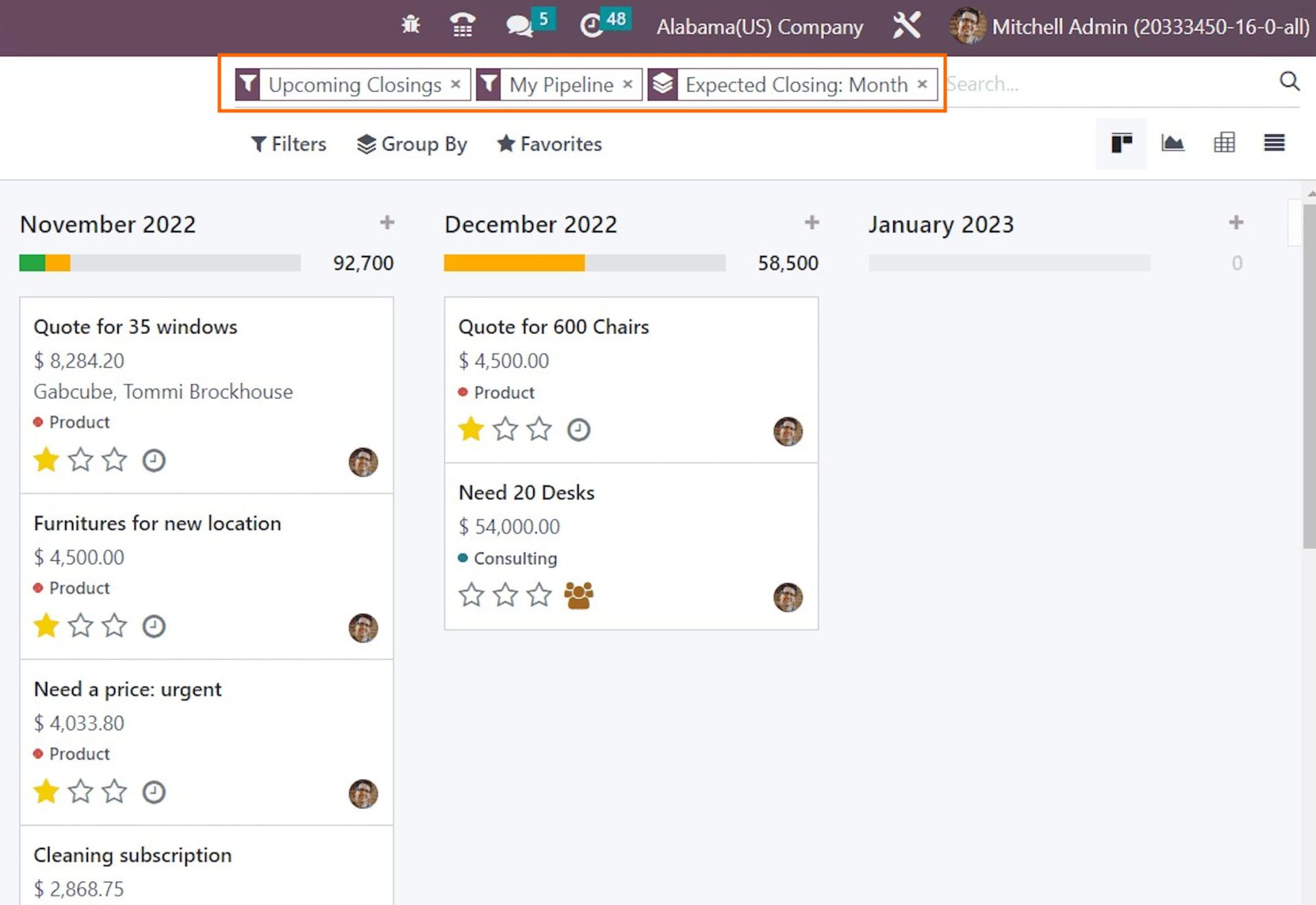
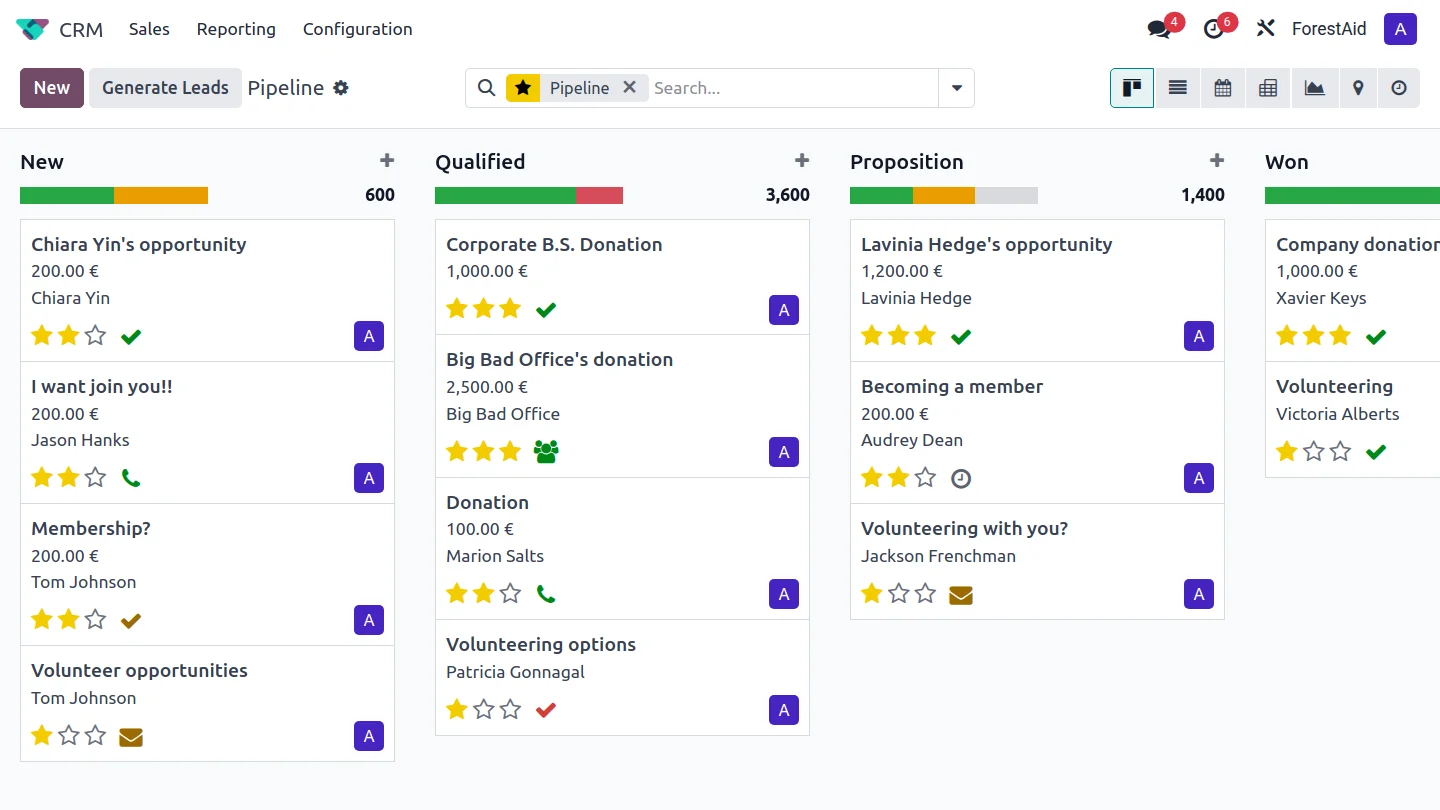
Odoo CRM shows your sales pipeline in a clear, visual way. You can see all deals and their stages at once. This helps sales teams track progress and focus on important deals. Moving deals between stages is simple with drag-and-drop tools.
Activity Scheduling
Scheduling activities is easy with Odoo CRM. You can plan calls, meetings, and tasks directly within the system. Reminders keep you on track and prevent missed opportunities. This feature helps teams stay organized and meet deadlines.
Real-time Reporting
Odoo CRM provides real-time reports on sales performance and customer data. Reports update automatically as new information comes in. This helps managers make quick, informed decisions. The reports are easy to read and share with the team.
Integrating Odoo Crm With Other Modules
Odoo CRM does more than manage contacts and sales. It connects smoothly with other Odoo modules. This integration creates a powerful tool for business growth. Teams work better with shared data and clear processes.
Integrating Odoo CRM with other modules helps track customer journeys. It links sales, marketing, and support in one system. This makes customer management easier and saves time.
Sales And Invoicing
Odoo CRM works closely with Sales and Invoicing modules. Sales teams see customer data and past orders in one place. They create quotes and convert them to invoices quickly. This reduces errors and speeds up payments. Finance teams get real-time updates on sales and payments. The system also tracks unpaid invoices to improve cash flow.
Marketing Automation
The CRM links directly with Marketing Automation tools. Businesses send targeted emails based on customer data. Campaigns reach the right audience at the right time. Leads from marketing flow into CRM for easy follow-up. This connection helps measure campaign success and customer interest. It builds stronger relationships through personalized messages.
Customer Support
Customer Support integrates with Odoo CRM for better service. Support teams access customer history to solve problems fast. They log tickets and track their status in one place. The system alerts teams about urgent issues or delays. Customers get quicker responses and better care. Support and sales teams stay aligned to improve satisfaction.
Credit: www.odoo.com
Customization And Scalability
Odoo CRM adapts easily to fit unique business needs. Its customization and scalability help companies grow without changing systems. Users can create workflows that match their processes. They can add fields and views to track the right data. As businesses expand, Odoo scales up smoothly, handling more users and data.
Tailored Workflows
Odoo CRM lets you design workflows that suit your sales process. Automate tasks like lead assignment and follow-ups. Set triggers that match your team’s actions. This ensures no step is missed. Your sales flow stays organized and efficient.
Custom Fields And Views
Add custom fields to capture important information. Choose what data matters most for your business. Customize views to see data clearly. Create lists, kanban boards, or calendars. This makes it easier to manage customers and deals.
Scaling With Business Growth
Odoo CRM grows as your business grows. It supports more users and higher data volumes. Add new features without downtime or loss of information. The system stays fast and reliable. You can focus on sales, not software limits.
Tips For Maximizing Odoo Crm
Odoo CRM is a powerful tool for managing customer relationships. To get the best results, follow some simple tips. These tips help you keep the system clean, improve team work, and keep learning. This way, your CRM will work smoothly and help grow your business.
Regular Data Cleanup
Old or wrong data can cause problems. Check your CRM often to remove duplicates and fix errors. Clean data helps you make better decisions. It also keeps your reports accurate. Set a schedule to review and clean your data regularly.
Team Collaboration Practices
Good teamwork improves CRM use. Share customer information with your team clearly. Use Odoo’s tools to assign tasks and track progress. Encourage your team to update information quickly. This keeps everyone on the same page and speeds up work.
Continuous Training
Learning never stops with CRM. Train your team on new features and best practices. Short, regular sessions work best. Help your team understand how to use Odoo well. This increases confidence and reduces mistakes.
Common Challenges And Solutions
Implementing Odoo CRM comes with its own set of challenges. These issues can slow down progress and affect business results. Understanding common problems and their solutions can help businesses use Odoo CRM more effectively.
User Adoption Issues
Many users find new software hard to use at first. This slows down their work and causes frustration. Training sessions help users learn the system step-by-step. Clear guides and support reduce confusion. Regular feedback from users improves the system over time.
Data Migration
Moving data from old systems to Odoo CRM can cause errors. Missing or wrong data affects decisions and customer relationships. Careful planning is necessary before migration. Use tools that check data for mistakes. Testing the data after moving ensures accuracy and completeness.
Integration Complexities
Odoo CRM often needs to work with other software. Integrating different systems can be difficult. Compatibility issues may arise, causing delays. Choose integration tools designed for Odoo. Test each connection thoroughly. Keep systems updated to avoid conflicts and improve performance.

Credit: www.youtube.com
How Our Company Can Help You with Odoo for Crm
Practical Learning with Odoo CRM
Understanding the benefits and key features of Odoo CRM is just the beginning. To truly leverage its potential, hands-on experience with customization and scalability is essential. Exploring how Odoo CRM integrates with other modules can reveal powerful ways to streamline workflows and enhance team collaboration.
For business owners and managers aiming to maximize efficiency, experimenting with tailored configurations helps address common challenges effectively. This practical approach builds confidence in adapting Odoo to unique operational needs, aligning perfectly with strategies for digital transformation.
- Start by mapping your sales processes within Odoo to identify customization opportunities.
- Test integrations with inventory or marketing modules to create seamless data flows.
- Use real-world scenarios to troubleshoot and overcome typical CRM hurdles.
For additional guidance, consulting experts familiar with optimizing Odoo across various industries can provide valuable insights. Feel free to reach out at contact@yourcompany.com for advice tailored to your business context.
Frequently Asked Questions
What Is Odoo Crm And How Does It Work?
Odoo CRM is a tool to manage customer relations and sales processes. It helps track leads and opportunities.
How Can Odoo Crm Improve Sales Management?
Odoo CRM organizes sales activities and tracks customer interactions. It helps sales teams work smarter and faster.
Is Odoo Crm Suitable For Small Businesses?
Yes, Odoo CRM is flexible and affordable, making it ideal for small and growing businesses.
Can Odoo Crm Integrate With Other Business Tools?
Odoo CRM easily connects with other Odoo apps and popular software like email and accounting tools.
What Features Make Odoo Crm User-friendly?
Odoo CRM offers a simple interface, easy customization, and mobile access for managing sales on the go.
How Does Odoo Crm Help With Customer Support?
It tracks customer issues and communication, allowing quick responses and better service management.
Conclusion
Odoo for CRM helps businesses manage customer relationships easily. It keeps all customer data in one place. Teams can track sales and improve communication fast. The system adapts to different business needs and grows with you. Using Odoo saves time and reduces errors in daily tasks.
It supports better decision-making with clear reports. Choose Odoo for CRM to keep your customers happy and your business organized. Simple, smart, and effective.
